Welcome to WordPress. This is your first post. Edit or delete it, then start writing!
Blog
-
How to Rank in AI Overviews: 9 Page-Level Optimizations
Ever since AI Overviews rolled out, one of the most common questions in marketing communities has been: how do you rank in AI Overviews? Reports from Semrush, Ahrefs, and other publications have helped explore this. But what page-level optimizations can you make to improve your chances?
To answer this, I analyzed 219 pieces currently ranking in AI Overviews and studied their traits. These included:
- Cosine similarity of a search query with the page title
- Title length
- Word count
- Links (External, internal links, and backlinks)
- SERP position
- Domain authority
- Readability
Let’s dive into my findings, along with expert insights on what they might mean.
Methodology
I used ChatGPT to generate 100 random queries and recorded 2–4 content pieces ranking in AI Overviews for each query. Once I had the URLs, I ran them through Semrush and Screaming Frog to gather data on all variables.
After compiling a complete dataset, I used Python to calculate cosine similarity and perform data analysis and visualization. You can find the full dataset and analysis on GitHub.
The variables I collected include:
- Query
- Niche similarity
- Title length (characters)
- Title text (H1)
- Is the title a question
- Cosine similarity between the search term and the title
- Word count
- Number of external links
- Number of internal links
- Number of backlinks
- SERP position
- Domain Authority (DA)
- Readability score
Note: Some queries didn’t generate AI Overviews. I excluded YouTube videos, landing pages, and documentation from the dataset; only blog content is included.
Summary of key findings
- Higher cosine similarity between search terms and content titles strongly correlates with better SERP rankings, especially in the top 10 results.
- Low DA sites consistently produce easier-to-read content, with scores clustered around “Fairly Easy” and “Very Easy.”
- High and mid Domain Authority (DA) sites generally cluster around “Normal” readability.
- The most common content title length is 41–60 characters, representing 42.5% of all titles and aligning with SEO best practices.
- Over half (54.8%) of AI Overview content comes from high DA sites, while mid DA sites contribute 37.9%.
- 50.7% of websites appearing in AI Overviews have 100+ backlinks, and these sites also tend to rank above those with fewer backlinks.
- 55.5% of content ranking in AI Overviews has 30 or fewer external links, with 22.4% of AIO pages having just 0–10 external links.
- 71.2% of content ranking in AI Overviews has 10 or fewer internal links.
- 29.5% of content ranking in AI Overviews has a word count between 1,000 and 2,000 words.
High title-query cosine similarity wins SERP
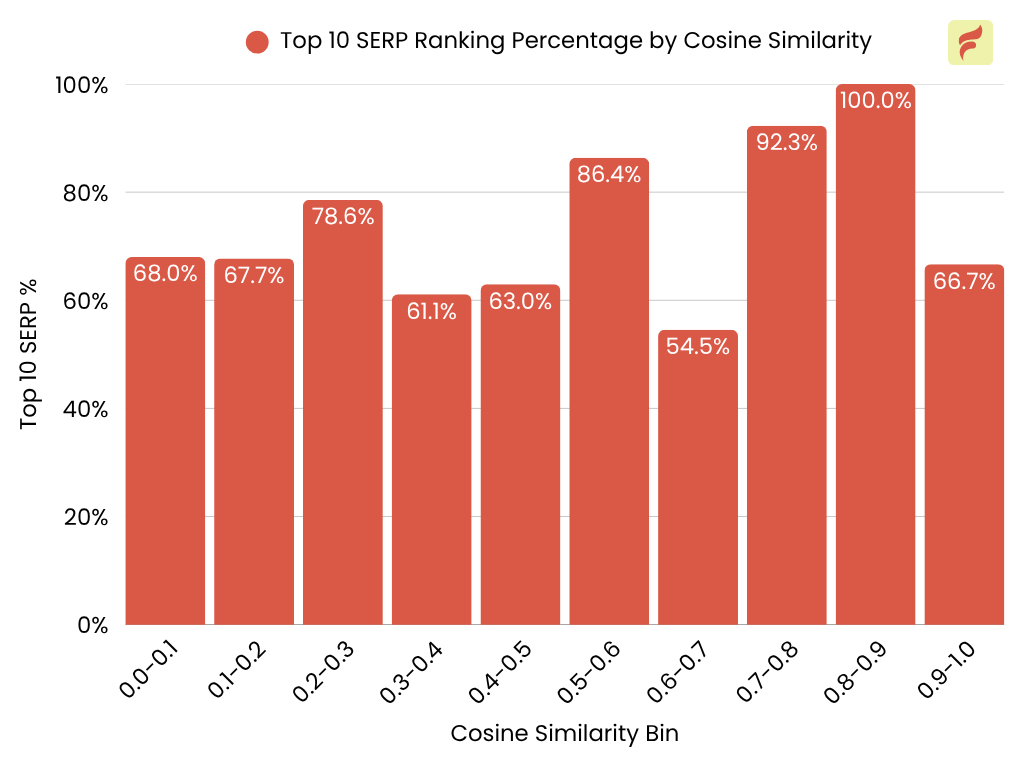
There is a strong positive correlation between higher cosine similarity (between the search term and content title) and the likelihood of ranking in the top 10 SERP positions.
The ratio of pages in the top 10 SERP positions increases significantly as cosine similarity rises, peaking at the 0.8–0.9 bin (92.3%) and reaching 100% in the 0.9–1.0 bin.
Lower cosine similarity bins (below 0.5) generally show a lower ratio of top 10 rankings, with a notable dip at 0.6–0.7 (54.5%).
Key takeaway: Traditional SEO is still worth it. Writing titles that closely match your target query will help you rank at the top of the SERP.
“We’ve seen better results with AI Overviews when our titles match what people really search for. Not just keywords, but the way they ask questions. So instead of using a title like ‘Cloud Modernization Benefits,’ we go with something closer to how someone might actually search. Like: Why move to the cloud now? Such natural, intent-driven phrasing has made a huge difference in how often we get picked by AI.” — Sanjay Barot, Senior Digital Marketing Strategist, Radix Web
Top-ranking content dominates AIOs
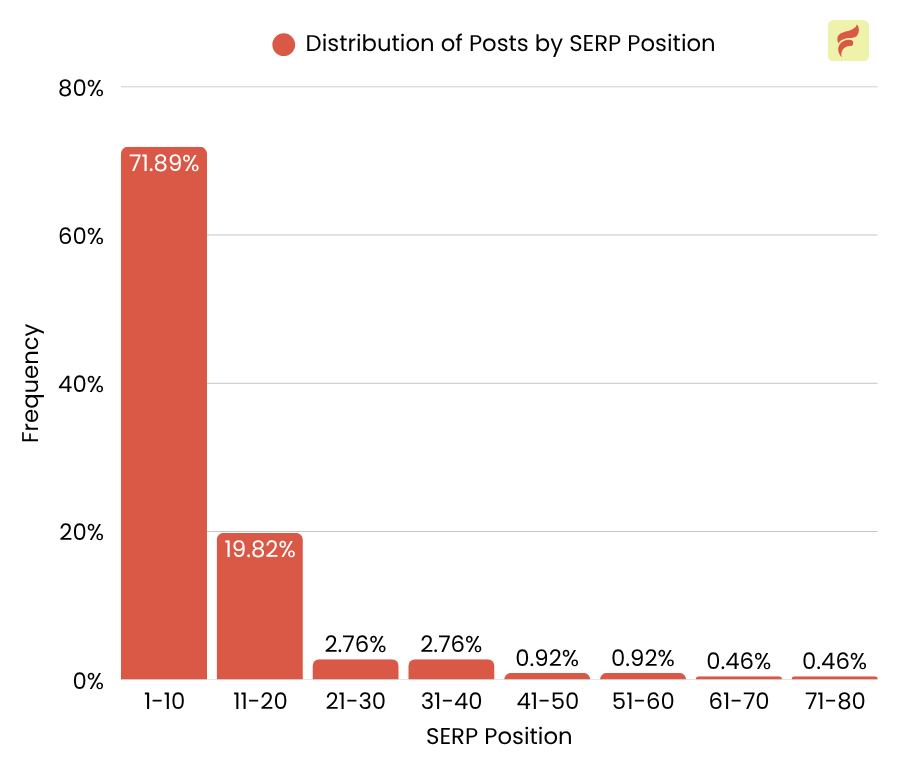
71.9% of content featured in AI Overviews ranks within the top 10 search results. This drops to just 19.8% for content in positions 11–20, and declines even further beyond that.
Key takeaway: Since high title-query cosine similarity boosts SERP rankings, and top-ranking content dominates AI Overviews, strategic keyword optimization and securing a top 10 position significantly increase your chances of appearing in AIOs.
“We noticed our content started appearing in AI Overviews only after we focused on boosting domain authority. The biggest shift came from earning backlinks from credible, niche-relevant sites, so think specialty coffee blogs, wellness publications and digital PR features. Google seems to favor domains that show both topical consistency and external trust signals. Even well-optimized content didn’t make the cut until our domain had that credibility.” — Mimi Nguyen, CEO and Co-Founder, Cafely
High-authority websites publish content with normal readability
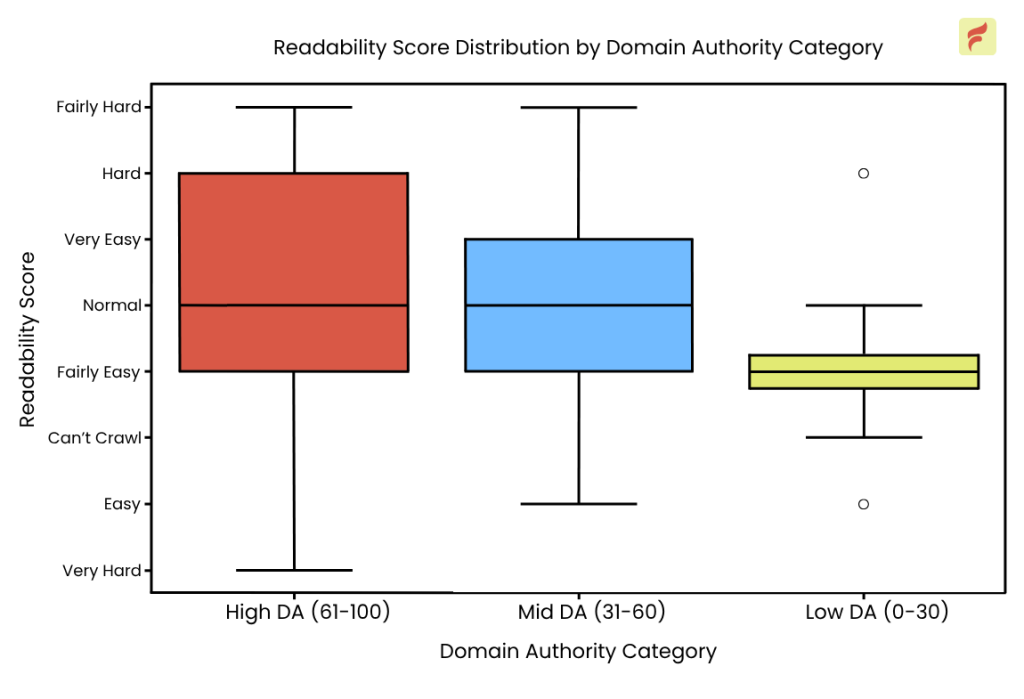
The median score for high authority and mid authority websites is around “Normal” readability, suggesting that most content from higher-authority sites is written at a moderate reading level.
The scores are tightly clustered around “Fairly Easy” and “Very Easy,” with a lower median compared to high and mid DA.
Low DA sites may need to compensate for their lack of authority by making their content as accessible as possible, aiming for higher readability scores to attract and retain users.
Key takeaway: The Normal readability for higher DA sites suggests that Google does not penalize moderately complex content from trusted sources. But lower DA sites might benefit from maximizing readability.
“I always write for readers who are at grade 9 or below.
The reason being is that doing so is what often helps people land in AI overviews, because the average reading grade level tends to be at about a high school level.
With that being said, so long as you’re being conversational, keeping sentence lengths short, and being aware of the type of user searching for your content, you can have some wiggle room with your reading level.
For example, we’ve ranked for content in the senior living industry by writing to a high school level reader, but for a greenhouse gas emissions verification team, we write at a college level, given that many of the readers are college-educated.
By being aware of your target audience’s demographics, you can better tailor content to rank in AI overviews. To whom this may concern.” — Aaron Wertheimer, SEO Marketing Copywriter, Marketing Reel
Titles between 41–60 characters rank most often in AI Overviews

Titles with 41–60 characters are the most common, making up 42.5% of all data points. Titles with 21–40 characters (17.8%) and 61–80 characters (17.4%) are also relatively common.
Key takeaway: Most content creators aim for titles between 41 and 60 characters, reflecting industry best practices for SEO and user experience.
“One thing that helps me is making the title short and easy to understand. Not smart. Not cute. If you said honest things, people would look. No matter what the story is, “Sell my house fast in California” still gets the job done.” — Justin Azarias, CEO and Founder, Property Homebuyers CA
Backlinks improve AIO visibility
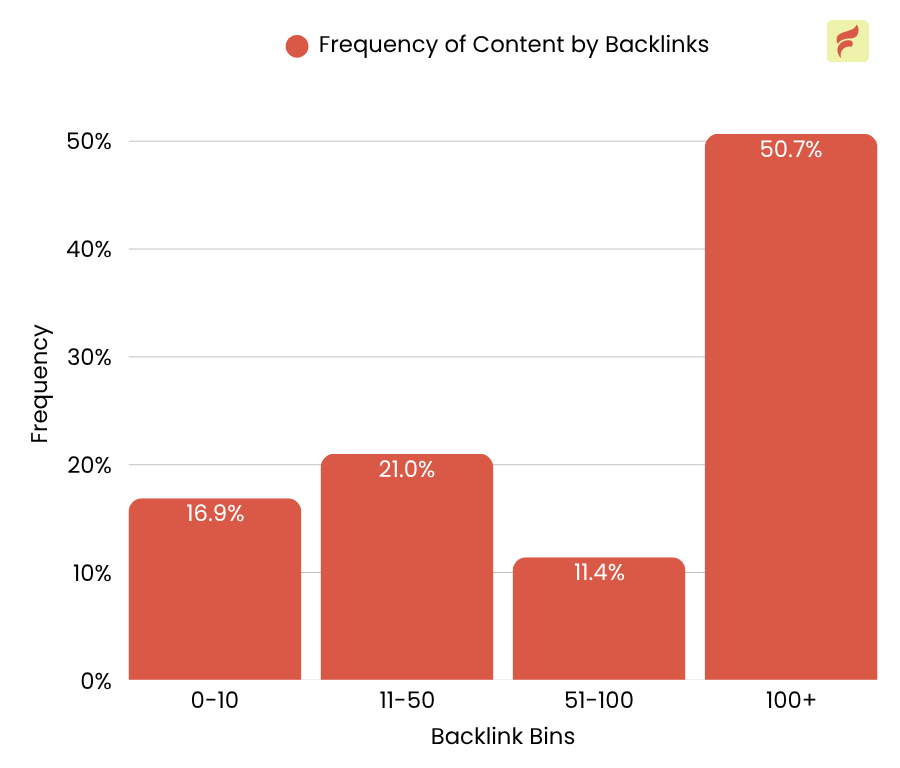
50.7% of websites featured in AI Overviews have 100 or more backlinks, and they tend to outrank sites with fewer links.
Another 32.4% have between 11 and 100 backlinks, while only 16.9% of AIO content comes from pages with 0–10 backlinks.Key takeaway:
A strong backlink profile significantly increases your chances of ranking in AI Overviews. Focus on earning high-quality links to build authority and improve visibility.“AI overviews are based on current SERPs. There’s no “if”—you’ll always find top-ranking sites on normal SERPs ranking in AI overviews, too. Sure, the order is a bit different, but the top sites are still there.
Therefore, when taking into account that PageRank, in other words, backlinks, are the fundamentals of SEO, as stated in the SEO Starter Guide by Google, that means that backlinks automatically translate to the main ranking factor in AI overviews as well.” — Bogdan Krstic, Owner, Krstic SEO
Most pages in AI Overviews have fewer internal links
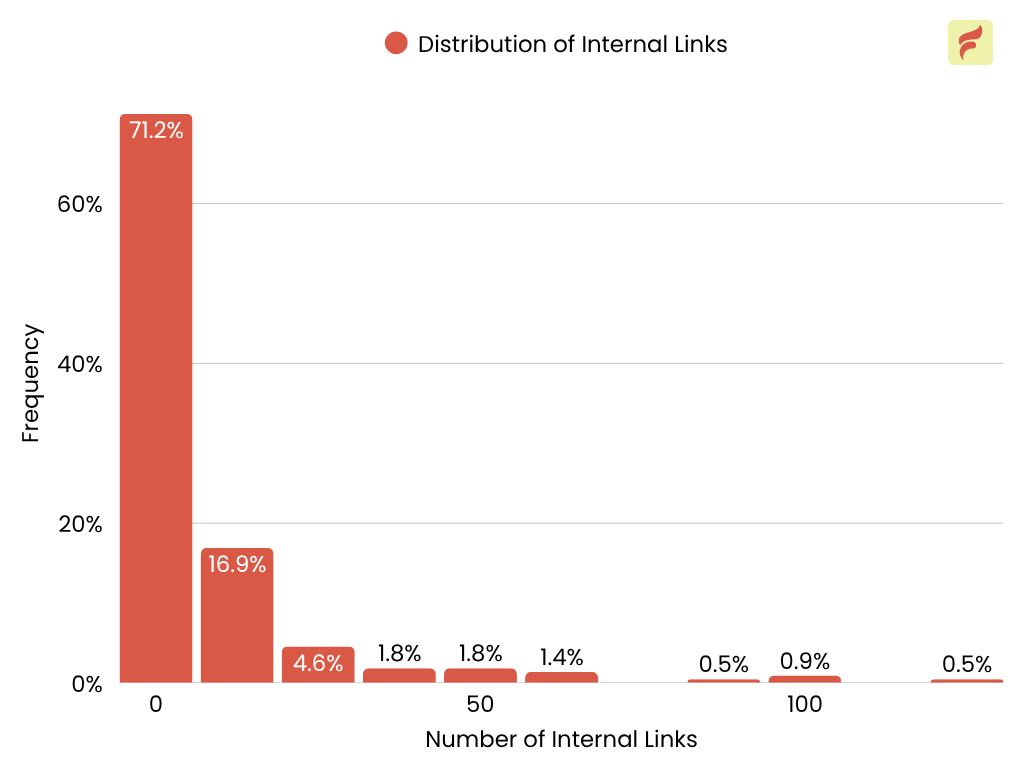
71.2% of pages in AI Overviews have between 0 and 10 internal links.
Only 16.9% have 11–20 internal links.
Pages with more than 50 internal links are extremely rare.
Excessive internal linking is uncommon, possibly because it can dilute link value and confuse both users and search engines.
Key takeaway: Over-interlinking can harm your SEO; instead, focus on linking to pages that add value and make sense.
“We’ve seen that tight internal linking around semantically related content clusters has had the biggest impact. When we grouped blog posts around specific keyword intents and ensured clear parent-child linking (with consistent anchor text), those pages started surfacing in AIOs — especially when supported by a strong informational page acting as a topical hub.
Also, pages with titles under ~60 characters and a clear meta description (even if not shown directly) tended to do better in AI summaries — likely because the AI pulls concise context early.” — Nikita Sherbina, Co-Founder and CEO, AIScreen
Most AIO content has few external links
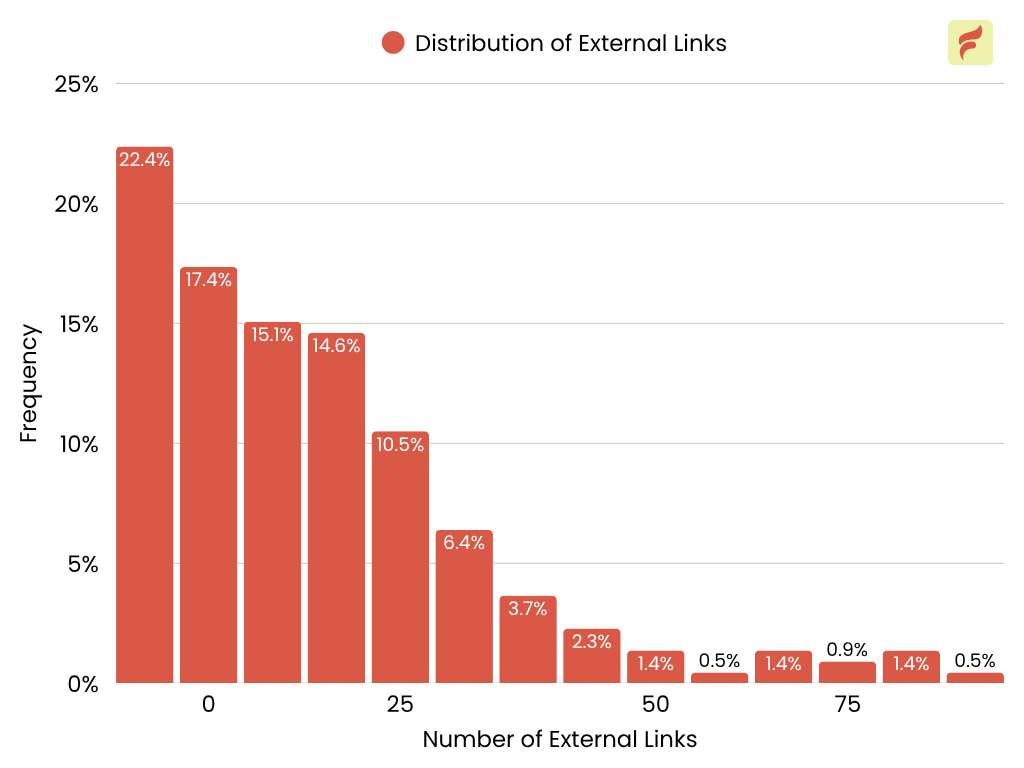
22.4% of AIO pages have just 0–10 external links. 17.4% have 11–20, and 15.1% have 21–30.
Another 14.6% fall in the 31–40 range, while only 10.5% have 41–50 external links.
The percentages continue to drop as the number of external links increases, with very few pages exceeding 70.
Most content featured in AI Overviews includes a moderate number of external links, typically between 1 and 40. This suggests that linking to relevant, authoritative sources is common among high-performing AIO content, but over-linking is rare for ranking in AI overviews.
Key takeaway: If you want your content to be considered for AI Overviews, aim for a balanced external linking strategy. Add external links to provide value and context, but not so many that it overwhelms the content or appears spammy.
Content ranking in AIOs has a moderate length
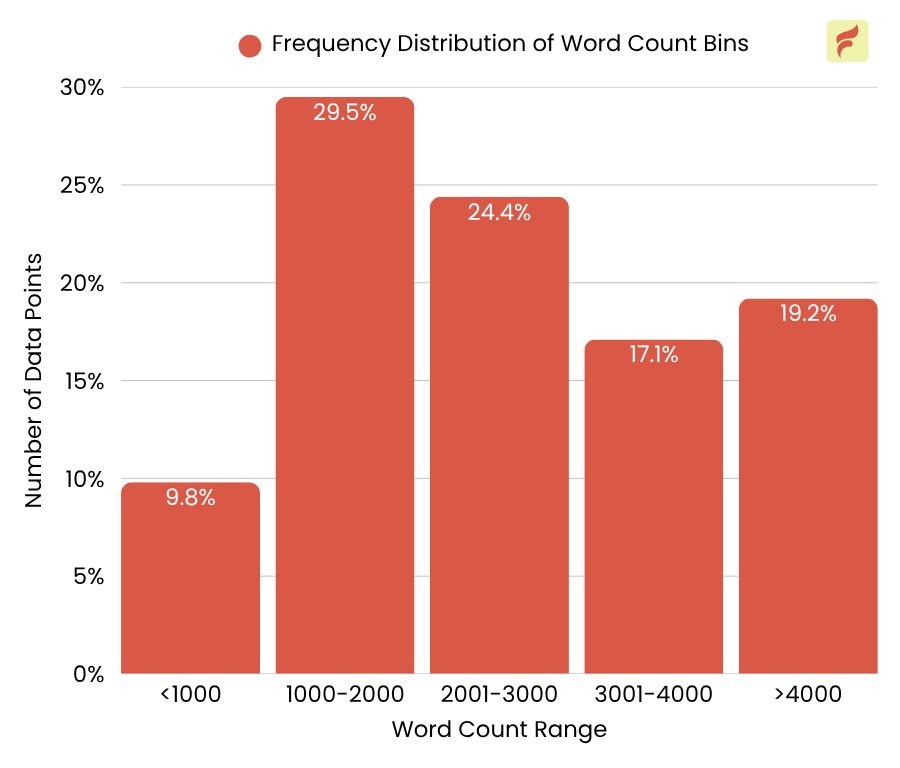
53.9% of content in AI Overviews has a word count between 1,000–3,000. This drops to 17.1% for content with 3,001–4,000 words.
This suggests that moderately in-depth articles are more likely to be featured, while excessively long content may not necessarily improve your chances of ranking in AI Overviews. Prioritizing clarity and relevance over sheer length appears to be more effective.
Key takeaway: Focus on delivering value over word count. Clear, relevant content is more likely to be featured in AI Overviews than lengthy articles with filler.
“I really believe that content length matters for ranking in Google’s AI Overviews. This format is generally weighted in favor of complete content at the risk of some clarity.
The exact length is subjective, to some extent, but shooting for a longer short-form is often helpful. Shorter pieces that don’t have much depth probably won’t cut it, but the trick is striking a balance.” — Dennis Shirshikov, Head of Growth and Engineering, Growth Limit
Title-query similarity is key but rare
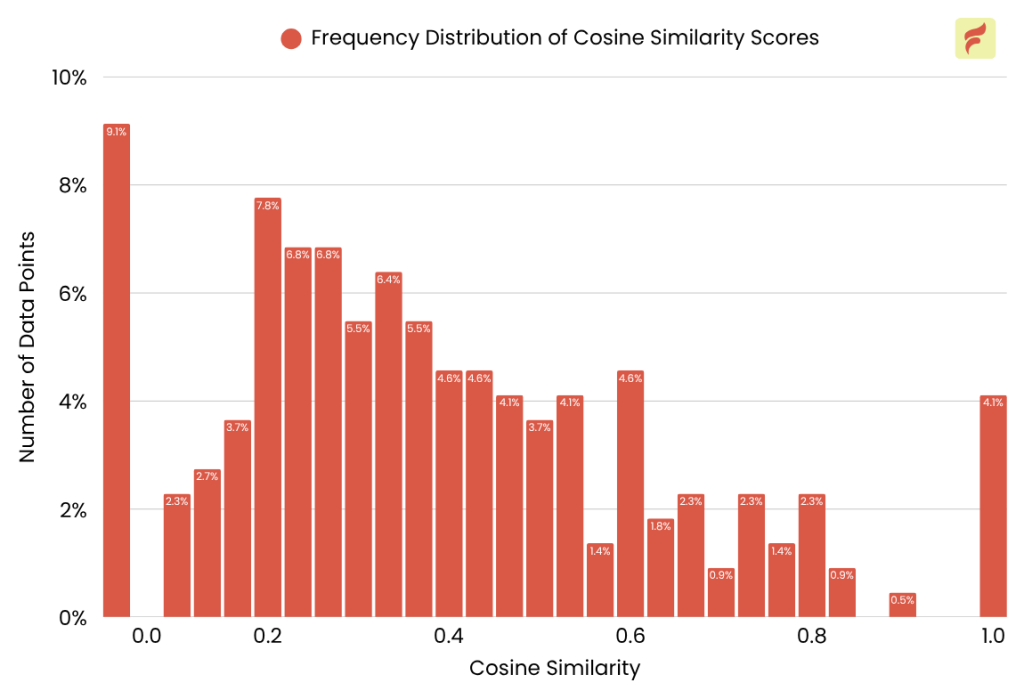
Top-ranking content titles are highly aligned with the user query. However, only 4.1% of all content achieves this high level of semantic similarity.
This gap presents a clear opportunity for publishers: to increase their chances of ranking in AI Overviews, they should create content that closely matches user intent and mirrors the exact language users are searching for.
Key takeaway: Focus on optimizing your titles for semantic relevance and content for search intent to increase the likelihood of being featured in AI-generated summaries.
“We’ve found that incorporating LSI keywords, semantically related terms and phrases dramatically improves the chances of content being featured in AI Overviews. Google’s AI systems don’t just look for exact match keywords anymore; they assess topic comprehensiveness.
By naturally weaving in related concepts, synonyms, and contextually relevant terms, you help the AI better understand the depth and relevance of your content. It’s not about keyword stuffing, it’s about language that mirrors real-world user intent.” — Kishan Soni, Sr. SEO Specialist at Dreamcast
Niche alignment matters
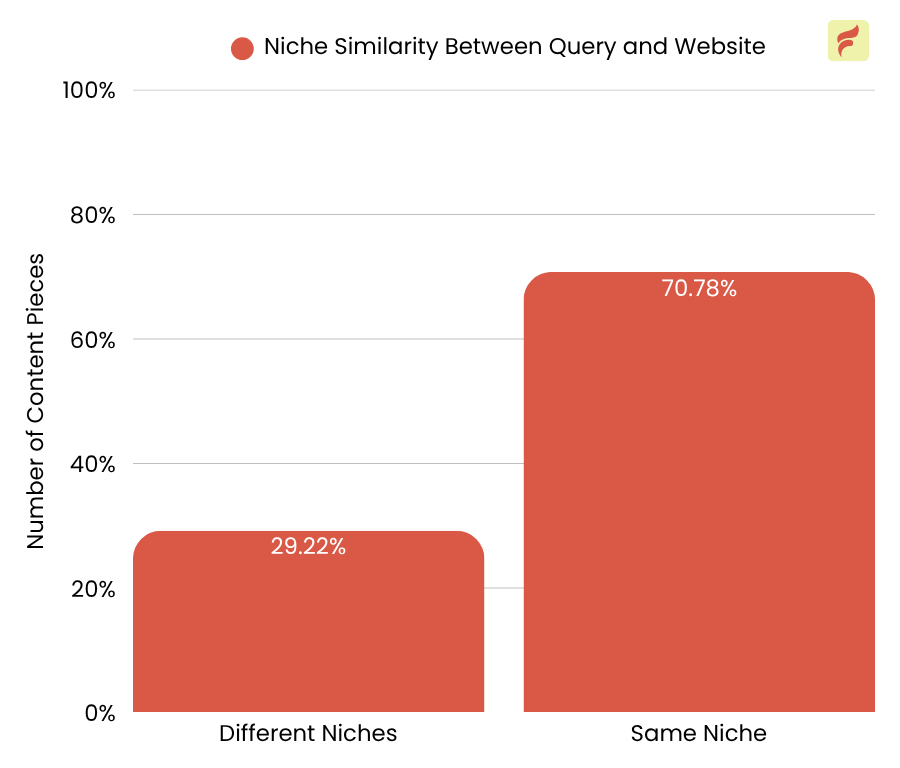
70.78% of content ranking in AI Overviews originates from websites whose niche closely matches the user’s query niche, while only 29.22% comes from sites in different niches.
This highlights the importance of topical relevance. Websites that are recognized authorities or specialists in the subject area of the query are far more likely to have their content featured in AI Overviews.
While less common, nearly a third of ranking content comes from sites outside the query’s niche, showing that it’s still possible for high-quality or relevant content from broader sites to appear.
Key takeaway: Prioritize building strong topical authority within your niche. Align your content closely with your site’s core focus to maximize relevance and trustworthiness in the eyes of AI ranking systems.
“One of the most consistent characteristics we’ve observed in content that appears in Google’s AI Overviews is a well-crafted title that closely aligns with search intent, particularly when supported by a strategically structured internal linking framework.
For example, a recent article we published titled “What Is AI SEO? Definition, Tools & Ranking Strategies” began ranking in AI Overviews for various queries. We believe this visibility was driven by three key elements:
- A title structure that reflects user questions and keywords;
- Clear semantic subheadings that anticipate follow-up queries;
- And a network of internal links using descriptive anchor text to reinforce topical authority.
These optimizations resulted in a noticeable increase in impressions for AI Overview-triggered queries, as seen in our Search Console data.” — Manpreet Kaur, Link Building Specialist, SEM Consultants
Page-level optimizations for ranking in AIOs
Google’s AI Overviews tend to favor established websites. Smaller sites need to invest in traditional SEO to rank. This means increasing domain authority through consistent content creation, technical optimization, and satisfying search intent with clear, helpful content that directly answers the query.
Building high-quality backlinks is also essential. Strategic networking and digital PR can help amplify your backlink campaigns and improve visibility. While AI Overviews may seem unpredictable, the fundamentals of SEO still apply. For smaller sites, focusing on quality and relevance is more important than ever.
Contact us if you need expert help to increase your website’s visibility for both bots and humans.
-
What Is Technical Copywriting? Myths, Challenges, and Best Practices
Behind many successful B2B tech sales is one underrated skill: technical copywriting. Yet it’s often misunderstood. Some mistake it for dry documentation. Others shy away from using storytelling or emotion.
And too often, it’s cluttered with buzzwords like “disruption” and “innovation.” But technical copywriting is none of those things.
In this guide, I’ll walk you through all things technical copywriting, from the to common myths, key challenges, and tips for finding the right copywriter.
What is technical copywriting?
Technical copywriting is copywriting to turn dry information into compelling, persuasive content that drives action. It speaks to a more informed audience who know the tech, the specs, the jargon, but still need a clear reason to care.
Often, the audience isn’t purely technical. They might not write code or manage infrastructure, but they’re still responsible for technical decisions. For example, a marketing manager at a tech company might need to choose a tool that simplifies engineers’ onboarding.
Businesses that offer complex products like SaaS tools, engineering solutions, or healthcare tech benefit most from technical copywriting. It bridges the gap between features and real-world outcomes, turning product knowledge into measurable conversions.
Differences between technical copywriting, technical content writing, and technical writing
Type Goal Style Example Technical Copywriting Persuade and convert Persuasive, benefits-focused Landing page for a DevOps tool with a “Book a demo” CTA Technical Content Writing Educate and build trust Informative, SEO-friendly Blog post on “How our API speeds up payment integration” Technical Writing Instruct and explain Clear, factual User manual for setting up a firewall Technical copywriting: It’s about persuading technical decision makers. It focuses on driving signups, demos, or purchases by positioning a technical product in a way that resonates with business goals or user pain points.
Technical content writing: It leans into education. It builds awareness and trust by breaking down how a product works or solves a specific problem through blog posts, tutorials, or whitepapers.
Technical writing: Technical writing is instructional. It sticks to user manuals, documentation, and product specs. Its job is to explain, not convince.
How to drive sales with technical copywriting
The technical audience wants clear, logical reasons to trust you. That’s where technical copywriting comes in, bridging accuracy with persuasion to drive action.
Here are a few tips for writing technical copy that converts without compromising clarity or credibility.
Understand your audience deeply
Know who they are, what roles they hold, where they work, and what pain points they face daily. The better your insight, the sharper your messaging will be.
You can use review mining, forums, client conversations, and interviews to gain a deeper understanding of your audience.
Speak their language
Use the terminology your audience uses, not internal jargon. Whether you’re a developer, product manager, or IT lead, your tone should feel familiar and credible.
For example, your audience might refer to a data bottleneck as a data clog, and using that language will evoke a sense of familiarity.
Match the reader’s expertise level
Don’t oversimplify complex ideas. Strike a balance between technical depth and clarity to avoid boring copy or losing authority.
For example, if your target audience is a seasoned cybersecurity professional and your copy is oversimplified as if written for beginners, it might give the impression that you’re underestimating them.
Craft CTAs that speak their language
Use calls to action like “Book a technical demo” or “See the architecture in action.” Always keep one CTA per copy and make the action as easy and quick as possible.
For example, if you ask users to sign up but the signup process takes minutes, they may abandon the page halfway.
Use clarity to build credibility
When your copy simplifies without compromising clarity, it earns trust quickly. Instead of bulking your landing page with phrases like “driving disruption through AI-driven solutions,” be clear about what you offer and who it’s for.
Frame your product around real-world problems
You’re not selling a feature, you’re solving a bottleneck. For example, you might offer cloud hosting services, but the benefit users care about is avoiding the hassle of building and maintaining their own storage infrastructure.
Back claims with proof
Case studies, metrics, and customer wins show you’re not just talking the talk. Add these claims in places where they build trust.
For example, your best testimonial, sitting at the bottom of the page, might not be as effective; it’s better placed near a key call-to-action (CTA).
Common myths and challenges about technical copywriting
Because it straddles both creative and technical domains, technical copywriting comes with its own set of myths and challenges. Let’s explore them and how to overcome each one.
Common myths about technical copywriting
Technical copywriting myths can hold back your content’s impact and make it harder to connect with your audience. Let’s break down the biggest myths so you know what technical copywriting really looks like.
Technical writing lacks creativity
Contrary to this myth, technical copywriting requires significant creativity. You present complex information in a clear, engaging, and user-friendly manner. It’s about decoding complicated concepts and shaping them into a narrative your audience wants to read.
Technical writing shouldn’t involve storytelling
In reality, storytelling helps connect product features to real-world outcomes. A strong narrative makes even the most complex tech relatable by showing how it fits into your audience’s daily workflow or solves a pain point they recognize.
Technical copywriting doesn’t need clear structuring
Even if the content is solid, a messy structure will lose the reader. Technical copywriting demands clarity, and that starts with how the information is organized. Strong formatting, intuitive flow, and logical progression help guide technical readers who want answers fast.
Technical audience doesn’t need persuasion
It’s a common misconception that technical buyers make decisions purely based on specs. But logic alone doesn’t drive conversions. These audiences still need to understand why your product matters to them. Effective technical copywriting positions the product as a solution, not just a list of features, making the case for why it’s worth the investment.
Common challenges in technical copywriting
From striking the right balance between precision and readability to quickly mastering complex topics, these challenges can trip up even experienced writers. Let’s take a closer look at what they are and how to overcome them.
Balancing accuracy, clarity, and tone
Technical copy needs to be precise without overwhelming the reader. Whether you’re writing for a CTO or a non-technical stakeholder, your tone and depth should shift accordingly, without losing clarity or authority.
Start by identifying your primary audience. Are you writing for engineers, executives, or end users? Then, tailor the level of technical detail and tone accordingly.
Technical copywriters also need to adapt based on their marketing channel. For example, if they’re writing for a webpage, they need to consider SEO to help it rank. If it’s a text overlay on a Pinterest video, they need to grab attention within a few seconds with concise, impactful wording.
Mastering complex topics quickly
Technical copywriters often jump into unfamiliar territory. That means learning quickly, asking insightful questions, and translating technical information into copy that directly addresses the audience’s needs.
This means you’ll need to be good at digging into research, connecting dots across sources, and even using AI tools to teach yourself complex topics on the fly.
Using the right amount of jargon
Jargon can build credibility, but too much of it creates friction. Great technical copy strikes the sweet spot: using terms the audience expects while maintaining a language that is accessible and focused.
To get the balance right, you need a deep understanding of your audience. Spend time review mining, conducting expert interviews, and analyzing sales calls or client queries. You can also tap into relevant communities to gather insights straight from the source.
Overcoming misconceptions about the role
Technical copywriting is often misunderstood or lumped in with documentation. However, unlike manuals, it’s designed to persuade, convert, and motivate users to take action.
While documentation explains how something works, technical copywriting is about why it matters. It connects features to outcomes, products to pain points, and tech to business value.
Essential skills for technical copywriters
But isn’t technical copywriting just copywriting? Well, not quite. It’s copywriting but with the added complexity of technical concepts. Let’s take a look at the must-have skills every technical copywriter needs.
Clear translation without dilution
You need to turn technical jargon into everyday language that still earns the respect of subject matter experts. The writing must feel accurate to insiders, but accessible to those making buying decisions.
When technical copy sounds too complex, it alienates non-technical readers. When it’s too simplified, it risks losing credibility. Skilled technical copywriters know how to strike the right balance.
Deep research and industry insight
From competitive analysis to customer pain points, effective technical copywriters know how to dig deep. Brownie points if they’ve niche expertise. Niche expertise is the most effective way to strike a balance between creativity and technicality.
For example, if you run an analytics business, consider hiring a technical writer with a data science background.
Balancing persuasion with precision
Accuracy is non-negotiable. But technical copy also needs to guide users toward action. The best writers craft messaging that’s both technically sound and psychologically compelling.
People with technical experience often take time to understand what good copywriting looks like. They might overlook the importance of backing up claims, persuading the reader, or evoking emotion.
The key is finding people who understand the best of both worlds.
When and why to hire a technical copywriter
If you have a creative streak, you might be tempted to write technical copy yourself, and sometimes, that’s enough. But if you’re struggling to close deals, the issue might not be what you’re saying, but how you’re saying it.
Here’s when and why you should consider hiring one:
Your product is complex, and the value prop isn’t landing
Maybe you’ve got a technically brilliant offering, but users don’t “get it” at a glance. A technical copywriter can surface your real value in language that clicks with your audience.
For example, you’re building an AI-powered analytics tool, but potential users don’t understand how it’s different from Google Analytics. A technical copywriter can break it down into clear, user-first benefits.
And yes, you need a technical copywriter for this, because they don’t just explain the product, they persuade users to sign up.
Your copy isn’t converting, despite being factually sound
A wall of specs won’t inspire action. A good copywriter connects product features to real-world benefits and builds in persuasive triggers. They also know how to structure information in a hierarchy that guides the reader, without overwhelming them.
For example, your homepage lists 50 features of your cloud platform, but bounce rates are high. A copywriter reframes those features as outcomes, such as “Deploy in minutes” or “Cut infrastructure costs,” and places each piece of information where it naturally fits into the user’s journey.
You’re speaking to both technical and business audiences
One page might need to resonate with both developers and decision-makers. A skilled writer adjusts tone and messaging without losing clarity or credibility.
For example, you’re pitching a developer tool to CTOs and hands-on engineers. A technical copywriter can discuss performance and ROI in one sentence and code efficiency in the next, without alienating either group.
You want clarity without sacrificing depth
Unlike generic writers, technical copywriters don’t shy away from complexity. They bring structure, story, and strategy to technical material so it informs, persuades, and converts.
For example, you’ve created a whitepaper on your new encryption algorithm. A technical copywriter turns it into a compelling lead magnet by explaining the ‘why it matters’ to your target audience, without oversimplifying it.
FAQs
Can a non-technical writer succeed in technical copywriting?
Yes, if they’re curious, research-driven, and willing to immerse themselves in the subject. But since they don’t have a technical background, they’ll have to spend even more time on research.
How to measure the effectiveness of technical copywriting?
Look at conversion metrics. This can include demo requests, trial sign-ups, time on page, bounce rates, and more. Excellent technical copy should both educate and sell.
Closing deals with technical copywriting
If done right, technical copywriting turns readers into users. It prompts them to click the sign-up button. If done wrong, even the most engaged visitors will walk away without converting. That’s where technical copywriters matter most.
We’ve helped tech companies increase targeted traffic by over 400% with strategic, conversion-focused copy. If you’re a tech company looking to turn interest into action, contact us today.
-
20 Best Marketing Channels for Small Businesses (And How to Pick Yours)
The urge to try every marketing channel is all fun and games—until you’re buried in tasks and the quality of each effort starts to drop.
People don’t buy from brands that aren’t relevant, and staying relevant requires focused, effective marketing.
So, which marketing channels are worth it for your small business? And how do you choose the ones that align with your goals and business model?
In this post, I’ll break down the best marketing channels for small businesses by category and business type. I’ll also show you how to get started with each and help you choose the best for your business.
What are marketing channels?
Marketing channels are the methods you use to connect with potential customers. Think of them as the different routes to reach people, whether through social media, email, SEO, or even word-of-mouth.
Choosing the right channels lets you focus your time and energy where it matters most, rather than trying to be everywhere.
If you feel overwhelmed by the number of options available, don’t worry about using all the channels. Even established businesses pick a few channels that match their business goals, audience habits, and content strengths.
Owned vs. earned vs. paid channels
There are three types of channels available, and each channel includes multiple platforms.
To better understand those platforms, let’s understand the three types of marketing channels:
- Owned channels: You fully control these channels, like your website, blog, or email list. They’re long-term assets that grow with your business.
- Earned channels: You earn these channels by impressing your target audience. This can include media mentions, customer reviews, and word-of-mouth. You don’t pay for them directly, but they come from good content, service, or outreach.
- Paid channels: You pay to reach your target audience through paid channels. For example, anyone can publish content on social media, but to reach a preferred audience through ads, you need to pay for the platform.
A good marketing strategy blends all three. You might use paid ads to attract new visitors, owned content (like a blog post) to educate them, and then earn shares or mentions if they love what you offer.
What is the difference between a channel and a platform in marketing?
Term What It Means Example Channel The communication method or tactic used to reach your audience Email marketing, content marketing, and social media Platform The specific tool or site where that communication happens Mailchimp, WordPress, Instagram - A channel is how you reach your audience.
- A platform is where you reach them.
For example, “email marketing” is a channel, while “Mailchimp” is a platform that helps you run your email campaigns.
Similarly, “social media marketing” is a channel, while “Instagram” or “LinkedIn” are the platforms within that channel.
Understanding this distinction helps you organize your strategy more clearly and choose the right tools for the job.
How to pick the best marketing channels for your business
Hoping into every marketing channel to lock in the most customers is a delusion. You need to pick 2-3 best marketing channels to drive meaningful conversions while staying within budget.
The best marketing channels depend on your business, and just because your friend is getting the most leads from Discord doesn’t mean you’d do the same. So here’s how to identify the best marketing channels based on your business.
1. Start with your business goals
Before you choose any marketing channel, be clear about what you’re trying to achieve.
If your goal is brand awareness, focus on high-visibility platforms, such as social media or podcasts. These channels help you stay top-of-mind and reach new audiences consistently. SEO, email marketing, and webinars can be more effective for lead generation, as they allow you to capture and nurture prospects over time.
If your primary focus is direct sales, paid advertising, and optimized landing pages will likely deliver the fastest results. Your marketing goal sets the direction for every other decision, so don’t skip this foundational step.
2. Know your audience
You need to know where your audience spends their time online, what content they prefer and how they typically discover new products or services.
This helps you avoid guesswork and focus your efforts where they matter most. Choose platforms where your audience is already active.
You can use tools like SparkToro to understand your audience’s preferred channels. Pair your insights with informal research. This can involve talking to your current customers, reviewing analytics, or joining relevant forums.
3. Align with your resources (Time, team, budget)
Some marketing channels require more effort than others. With an ambitious spirit, you might decide to put effort into more channels than you can handle, only to regret it later. So it’s important to be realistic about what you can handle.
If you’re low on time, focus on channels allowing repurposing. For example, email marketing lets you reuse blog content or social posts to stay consistent without starting from scratch every time.
If you have a small team, doing two or three channels well is better than spreading yourself thin trying to be everywhere.
And if your budget is tight, prioritize organic channels like SEO, social media, and blog content. These may take time to build traction, but they’re sustainable in the long run.
4. Test, track, and iterate
Begin with small campaigns, track your results, and adjust based on what’s working.
Use accessible tools like Google Analytics, social media insights, or even simple UTM links to measure performance.
Pay attention to what content drives clicks, engagement, or conversions, and use that data to refine your strategy.
Think of marketing as an ongoing experiment. The more you test and iterate, the closer you’ll get to finding a mix that consistently brings results.
5. Use industry benchmarks and competitor insights
Looking at what works for others in your industry can give you a head start. Identify the channels your top competitors are active on and observe the kind of content they publish.
Tools like SimilarWeb, Facebook Ad Library, or even checking their backlinks can reveal where they’re investing their efforts.
If a particular channel is delivering results for several businesses in your niche, it’s worth testing.
This doesn’t mean copying blindly, but rather using their strategy as a reference point to speed up your learning curve.
6. Combine channels for better results
Using a single channel in isolation is often insufficient. You’ll get better results by creating smart touchpoints across a few key platforms.
For example, if you publish a blog post, share it on LinkedIn or Pinterest to drive more traffic.
Use your Instagram bio to collect emails or lead magnet signups.
Retarget your email subscribers with Facebook or Google ads to stay at the top of their minds.
Multi-channel marketing doesn’t mean you have to be everywhere. It means choosing a few complementary channels that support each other.
When used together strategically, they can amplify your message and improve your reach without multiplying your workload.
Best free and organic marketing channels for small businesses
Organic marketing channels are free but require some time to build authority. And with authority comes long-term brand building. These channels grow your visibility, build trust, and generate leads while you sleep.
Each organic channel has its strengths; the key is to pick a few that align with your audience and goals.
Local SEO
Local SEO helps your business show up when people search for services “near me.” So if you serve local clients, most probably in your city, optimizing your Google Business Profile is the first step.
90% of people learn about a local business online, and 46% of all Google searches are about local businesses. So, you need to make sure your business name, address, phone number, and website are accurate and consistent across all platforms.
Add relevant service categories, a compelling business description, high-quality photos, and regular posts to improve engagement. To go further, encourage happy customers to leave reviews and respond to each one. This improves your rankings and builds trust.
How to get started with Local SEO
1. Sign in to your Google account and click Manage Now to claim your Business Profile.
2. Choose your business details and enter complete and consistent contact details across all platforms.
3. Upload quality images and update regularly.
4. Request reviews and reply to them promptly.
Local listings & online reputation management
31% of all local searches on Google display directories in search results. And in addition to that, these directories give you your first ever backlinks to set the pace.
Hence, submitting your business to trusted local directories like Yelp, Bing Places, and Apple Maps can increase your chances of being found online. But you’ll need to keep those listings accurate and up to date. Search engines cross-reference these platforms to validate your credibility.
Responding to both positive and negative reviews shows that you care about your customers’ experience. Encourage satisfied clients to leave detailed reviews on platforms that matter in your industry.
Regularly monitoring these listings also helps you spot and fix outdated or incorrect information before it turns away potential customers.
How to get started with local listings
1. Find relevant listings by searching [Niche] + directories/ [Niche] + directories in + [Region].
2. Submit your business to the directories. Some famous directories include Yelp, Bing Places, Apple Maps, etc.
3. Ask your customers to leave reviews for your profile. Monitor listings weekly for accuracy and reviews.
4. Respond to every review professionally.
Organic social media marketing
Like you, me, and all our friends, 90% of consumers use social media to keep up with trends. An average social media user uses over six different social media platforms. So you clearly need to be present on at least one of them.
Which social media platform should you use?
It depends on your audience. Here’s a quick overview to help guide your choice:
- If you’re a lifestyle brand, your audience is likely on Instagram, TikTok, and Pinterest.
- Running a tech company? You’ll probably find your audience on LinkedIn, GitHub, and Discord.
- For B2B businesses, LinkedIn is often the most effective platform.
- If you’re a local business, consider exploring Facebook and Reddit communities in your area. Instagram and TikTok can also be great for local reach.
Organic social media is a long-term brand-building tool that helps you stay visible and top of mind with your audience. Whether you’re using Instagram, LinkedIn, Facebook, or TikTok, the key is to create content that educates, entertains, and connects.
Posting regularly and engaging with comments, shares, and DMs builds trust over time. Focus on formats that suit your audience, like reels for fashion brands, carousels for educational content, and stories for connection building.
Highlight customer stories, behind-the-scenes content, or expert tips to position your brand as approachable and helpful. While growth may be slower than paid methods, the relationships built through organic efforts often lead to higher-quality conversions.
How to get started with social media marketing
1. Pick one or two platforms where your audience is active. You can use SparkToro to find these platforms.
2. Post 2-3 times per week using formats that work for you. You’ll have to test different formats in the beginning.
3. Use a content calendar to stay consistent.
4. Monitor insights to see what content performs best and adapt accordingly.
Word-of-mouth and referral marketing
People trust recommendations from people they know. Word-of-mouth and referral marketing rely on this trust. The best way to encourage referrals is to deliver a great product or service, then make it easy for customers to share their experience.
You can also set up a simple referral program that rewards existing customers for sending new ones your way. It doesn’t have to be complex. A small discount, freebie, or shoutout can be enough.
These small rewards go a long way because over nine in ten consumers trust referrals from friends and family.
How to get started with word-of-mouth and referral marketing
1. Identify loyal customers and ask them to refer others.
2. Offer a basic reward for each successful referral.
3. Create referral codes or simple tracking links.
4. Promote your program via email and social media.
Networking and strategic partnerships
Building relationships with other professionals in your industry or complementary industries can create win-win opportunities. This can be as simple as partnering with a non-competing business on a co-hosted event or guest posting on each other’s blogs.
Local networking groups, LinkedIn connections, or niche online communities can also help you stay top-of-mind when someone needs your service.
How to get started with strategic partnerships
1. Identify 3-5 non-competing businesses with shared audiences. For example, if you’re a web development agency, you can partner with a hosting provider.
2. Reach out with collaboration ideas like joint webinars or social swaps. The more valuable your collaboration, the more responses you receive.
3. Join online groups in your niche and engage meaningfully.
4. Follow up and build long-term relationships.
Event marketing
Hosting or participating in events allows you to connect directly with your audience. These don’t have to be large-scale conferences. Free workshops, community meetups, webinars, or panel discussions can be just as effective.
Events position you as a leader in your space while creating a chance for direct interaction. You get to hear your audience’s questions, share your expertise, and build stronger relationships in real time.
How to get started with event marketing
1. Choose a format and platform. For example, a webinar hosted on Eventbrite.
2. Promote the event via email and social media. Use creative copy and highlight clear value to increase sign-ups. For example, if you run a SaaS company for financial planning, your webinar could be about “how to cut expenses without lowering your standard of living.”
3. Ask partners or friends to reshare. Extend your reach by encouraging your network to share the event with their own audience.
4. Follow up after the event. Collect feedback and nurture long-term relationships with attendees.
Email marketing
Email marketing is cost-effective yet drives high returns. 30% of marketers globally cite email marketing as the highest ROI marketing tactic.
But writing emails that people really want to read can be tricky. Hence, good email copywriting is a must.
Start by growing your email list through your website or social media. In return, offer something useful, like a checklist, an ebook, or a resource guide. Keep emails clear, actionable, and relevant.
Over time, this builds a loyal audience more likely to convert when you make an offer.
How to get started with email marketing
1. Set up an email tool like Mailchimp or Kit.
2. Create a lead magnet and a signup form. If you don’t have a lead magnet yet, start with a simple value proposition like: “I’ll send three small business customer-hunting tricks to your inbox every Monday.”
3. Build a welcome sequence to introduce yourself and set expectations.
4. Send a regular newsletter or content update to stay top of mind.
5. A/B test with different formats and copywriting techniques to see what resonates with your audience.
Content marketing (Blogs, case studies, webinars)
Content marketing helps you build authority, educate your audience, and attract organic traffic. Start with a blog that answers common questions your audience searches for.
SEO for small businesses might look slow at first, but it builds long-term loyalty and authority on Google. Case studies and testimonials give social proof and demonstrate the results you’ve achieved for others.
Webinars or free video trainings can add a personal touch and position you as an expert in your niche. This content can be repurposed across channels, including social media, email, and even sales conversations.
How to get started with content marketing
1. Pick 2–3 content pillars your audience cares about.
2. Write blog posts or create short videos answering common questions.
3. Invest in SEO and digital PR to increase visibility.
3. Collect testimonials and turn them into simple case studies.
4. Expand into new formats like podcasts, webinars, or quizzes once you gain traction.
Community building (Online forums, Slack groups, etc.)
Creating or contributing to a niche community can be one of the most underrated organic strategies. Whether it’s a Facebook group, a Slack workspace, or a dedicated forum, these spaces allow people to ask questions, share insights, and connect with others in the same field.
Communities also help when you’re promoting an event. The key is to keep the community inclusive and supportive. You can use Reddit and Quora to answer questions and build trust.
The more people associate your name with helpful advice, the more likely they trust your business when they need help.
How to get started with community marketing
1. Join 2-3 relevant communities (on Facebook, Slack, Reddit, or Discord).
2. Share insights, answer questions, and be helpful. Keep your community interactions 80% helpful and 20% promotional.
3. Consider starting your own Facebook or Slack group.
4. Promote valuable discussions without pushing your product.
Top paid marketing channels for small businesses
Unlike organic channels, paid marketing channels can help you scale faster. These channels allow for precise targeting and measurable results, making them especially effective for short-term campaigns with specific goals.
Social media advertising (Meta, LinkedIn, TikTok)
With Facebook, Instagram, and YouTube ads giving the highest ROI, social media ads are one of the most customizable forms of paid marketing.
Meta platforms (Facebook and Instagram) offer highly detailed audience targeting based on interests, demographics, behavior, and engagement history.
If you’re a B2B business, LinkedIn Ads are ideal to reach professionals based on industry, job title, or company size. TikTok and Pinterest Ads work well for brands targeting younger, highly engaged audiences with short-form creative content.
The success of these ads depends heavily on strong creative, compelling copy, and well-defined targeting. Testing different formats, carousel, video, image, or lead forms, can help you determine what resonates with your audience.
However, you’ve to set a budget for paid marketing because with every lead comes expense. Precise targeting and good copywriting improve conversion and keep you from overspending.
How to get started with social media advertising
1. Choose your platform based on your audience: Meta (B2C), LinkedIn (B2B), TikTok (Gen Z, creatives).
2. Set up a business account and install the platform’s tracking pixel on your website.
3. Define your audience using filters like interests, job title, or behaviors.
4. Start with a low daily budget and test different ad creatives. Take inspiration from resources like the Meta Ads Library.5. Monitor results and tweak based on performance.
Search advertising (Google Ads, Bing Ads)
For every $1 spent on Google ads, businesses see $2 in revenue. While Google Ads is the most dominant platform, Bing Ads can also be effective for certain industries.
Search advertising allows you to appear at the top of the search results page (even above the first organic result) when potential customers actively seek your offer.
These ads are keyword-driven, so targeting the right search terms is critical. High-intent keywords like “buy,” “near me,” or “best \[service]” often lead to stronger conversions.
Search advertising is cost-efficient when managed well, as you only pay when someone clicks. Its performance relies on ad copy, landing page experience, and bidding strategy.
How to get started with Google Search Ads
1. Create a Google Ads account and link it to your website.
2. Use the Keyword Planner to find high-intent keywords related to your offer.
3. Create a campaign with ad groups focused on different keyword themes.
4. Write clear, action-oriented ad copy with a strong call to action.
5. Set a daily budget and monitor performance weekly.
Display and retargeting ads
Display ads appear as banners or visual placements across websites, apps, and YouTube. They’re best used to increase brand awareness or stay top-of-mind after someone has interacted with your business.
Retargeting ads specifically show your content to people who’ve visited your site or engaged with your content but didn’t convert. These ads help nurture leads throughout their decision-making process.
To get the most out of them, use segmented audiences such as past website visitors, cart abandoners, or newsletter subscribers, and serve personalized messaging based on where they are in the funnel.
How to get started with display and retargeting ads
1. Set up Google Ads or Facebook Ads and install tracking pixels on your website.
2. Create custom audiences (e.g., visited product pages, abandoned cart).
3. Design simple banner creatives with clear messaging and a CTA.
4. Launch a campaign targeting these audiences with personalized offers.
5. Test frequency settings to avoid ad fatigue.
Influencer marketing (Paid collaborations)
Partnering with influencers allows you to tap into the trust they’ve built with their followers. Paid collaborations can range from product placements in Instagram stories to full YouTube reviews or TikTok challenges.
Success here depends on fit and authenticity. It’s not about the largest following but the most relevant audience. Micro-influencers, in particular, often deliver better engagement rates and conversions for niche products or services.
How to get started with influencer marketing
1. Identify influencers in your niche. You can use platforms like Upfluence and Heepsy or do thorough manual research.
2. Reach out via DM or email with a clear value proposition.
3. Start with product gifting or small paid collaborations.
4. Provide clear creative briefs and goals (e.g., link clicks, use of coupon code).
5. Track performance with affiliate links or UTM codes.
Affiliate and partner marketing
Affiliate marketing involves paying partners a commission for each customer or lead they refer. These partners promote your product using unique tracking links on their blog, social media, or email list.
You only pay when they bring customers, making this a performance-based model that reduces upfront risk.
Partner marketing goes a step further, involving long-term collaborations with complementary businesses. For example, a CRM company might partner with a marketing agency to co-promote services. These partnerships work well when both sides have complementary products and the same target audience.
How to get started with affiliate and partner marketing
1. Choose an affiliate platform (e.g., ShareASale, Impact, or create a custom program via software like Tapfiliate).
2. Recruit affiliates with existing audiences related to your product. Also, list your affiliate program on your website and social media to attract interest from potential affiliates.
3. Provide unique tracking links and marketing assets (banners, copy).
4. Offer tiered commission structures to encourage growth.
5. For partnerships, identify businesses serving the same audience and pitch a co-marketing plan.
Paid email sponsorships
Sponsoring email newsletters allows you to reach a targeted, permission-based audience without building your own list from scratch. These newsletters often have high open rates because they’re trusted sources for curated content.
Look for newsletters that serve your industry or ideal customer niche. The more aligned the audience, the better the return on investment.
You can sponsor a dedicated email, a placement in a weekly roundup, or even a short ad in a popular newsletter section. But make sure the newsletter has a relevant and loyal audience. Make your offer clear and valuable, with a strong call to action that directs readers to your landing page.
How to get started with paid email sponsorships
1. Search for newsletters using Paved and SparkLoop.
2. Evaluate audience size, engagement rates, and niche relevance.
3. Negotiate a sponsorship type: dedicated email, sponsored section, or ad placement.
4. Craft a compelling message with a clear value proposition.
5. Track results using UTM tags and dedicated landing pages.
Niche marketing channels for small businesses
New and unconventional marketing channels are gaining traction. These channels offer early-mover advantages, especially in competitive markets.
Exploring niche platforms helps diversify your efforts and stay ahead of industry shifts. The key, however, is to choose channels that align with your goals and capabilities, so you don’t overwhelm your team.
Podcast and guesting
Podcasts are steadily growing as trusted sources of information and entertainment. For small businesses, they offer two key opportunities: advertising and guesting.
Running ads on relevant podcasts helps you target a niche, engaged audience. Many listeners trust podcast hosts, so ads read by the host often feel like a personal recommendation.
On the other hand, guesting allows you to establish credibility and share your expertise with an audience that aligns with your business. It’s a strong authority-building tactic, especially when you focus on industry-relevant or locally recognized shows.
Both strategies help you build trust, generate leads, and increase brand recall.
How to get started with podcasts and guesting
1. Research podcasts in your industry on Listen Notes or Spotify. You can also find guesting opportunities through LinkedIn or industry-specific communities.
2. Pitch yourself as a guest by offering unique value or a relevant story.
3. For advertising, contact the host directly or use networks like Podcorn or Gumball.
4. Include a promo code or landing page to track ROI.
AI-powered marketing tools (Chatbots, Predictive Analytics)
Small businesses can now use chatbots for 24/7 customer support, lead generation, and appointment scheduling without needing a dedicated team. These bots help reduce response time and increase conversions, especially on landing pages or social platforms.
Predictive analytics tools analyze customer behavior to forecast future actions. This allows you to personalize offers, send emails at the right time, or identify your most valuable customer segments.
You can still do predictive analytics alone if you’re tight on budget. No freelancer, no paid tools. All you need is:
- Your dataset
- Google Colab (free)
- Perplexity (AI assistant)
Here’s a step-by-step guide:
Step 1: Set up your notebook
- Open Google Colab and create a new notebook.
- Go to Perplexity and enter this prompt:
I have data in CSV format and I want to perform predictive analytics on it.
I don’t know anything about programming, so I’ll need your help to write code in Python.
Begin with generating a code that’ll help me import my data in a Google Colab notebook.
- Copy the code Perplexity gives you.
- Paste it into your Colab notebook and upload your CSV file.
Step 2: Read your data
- In Perplexity, enter this prompt:
Now that I’ve uploaded my data to the notebook, I want to analyze it.
Please generate a code for reading my file in Python and saving it in a variable.
- Copy the generated code.
- Paste it into your notebook and press Shift + Enter to run it.
Step 3: Analyze the data
- Give Perplexity this prompt (customize it with your actual variables):
I have these variables in my data: [Paste your variables].
Generate a Python code for analyzing and visualizing the relationship between month and best seller.
- Again, copy the code, paste it in the notebook, and run it.
Continue doing this until you’ve enough findings to make your marketing decisions. For example, if a certain product is sold the most during holidays, create and distribute timely marketing materials to increase sales during the season.
How to get started with AI-powered marketing tools
1. Use free chatbot builders like Tidio, Chatbase, or ManyChat to create basic bots.
2. Collect your CSV data and follow the step-by-step method using Google Colab + Perplexity (outlined above) to begin analyzing customer behavior.
3. Once confident, consider using more advanced tools like HubSpot or Amplitude Analytics for deeper insights.
4. Before scaling your AI strategy, start with tasks like identifying top customers, predicting seasonal trends, or segmenting by purchase behavior.
SMS and mobile push marketing
While often overlooked, SMS and push notifications are direct, immediate channels that can drive high engagement when used carefully. SMS marketing is particularly effective for time-sensitive promotions, event reminders, or re-engaging inactive customers.
The key to success with both is respecting the user’s attention and only sending high-value messages. Frequency should be limited; every message should feel relevant, personalized, and timely.
How to get started with SMS and mobile push marketing
1. Use platforms like Twilio, Attentive, or OneSignal.
2. Collect opt-ins through your website or checkout page. Explicit consent is legally required and critical for effective SMS marketing. Common opt-in points include website sign-ups, checkout flows, events, and QR codes
3. Segment your audience and set rules for frequency.
4. Craft short, high-value messages with clear CTAs. SMS messages should be concise (under 160 characters), personalized, and include a direct call to action to drive conversions
5. Track CTRs and opt-out rates to refine your approach.
Interactive content (Quizzes, Polls, Calculators)
Interactive content helps turn passive readers into active participants. Quizzes, polls, and calculators capture attention and generate valuable first-party data.
For example, a financial advisor could use a “How much should you be saving?” calculator, or a healthy meal restaurant could offer a meal quiz to match users with the right routine.
These tools improve engagement and time-on-page, making them particularly effective on websites, landing pages, and social platforms. Plus, the insights you collect can help segment your audience and improve future targeting.
How to get started with interactive quizzes
1. Use tools like Outgrow, Typeform, or Interact.
2. Create a quiz or calculator that solves a real problem for your audience.
3. Embed it on your website or landing page. This ensures easy access for your audience and helps drive traffic and conversions directly through your owned channels.
4. Collect emails or segment users based on their responses. It helps build targeted marketing lists and deliver personalized follow-ups, enhancing lead generation and nurturing.
5. Follow up with personalized content or offers.
Audio-only platforms (e.g., Clubhouse, Twitter Spaces)
Audio-only platforms allow for real-time, voice-based conversations. While they aren’t as widely used as mainstream social networks, platforms like Clubhouse or Twitter Spaces have cultivated niche communities around topics like tech, wellness, entrepreneurship, and marketing.
These platforms offer small businesses opportunities to host discussions, answer audience questions, or build authority by participating in industry-specific talks.
They require less production effort than video but still enable an authentic, direct connection. Audio-based engagement may become a more valued part of the marketing mix as more people seek genuine, unfiltered interactions with brands.
How to get started with audio-only platforms
1. Join platforms like Clubhouse or host Spaces on Twitter/X. Clubhouse remains a standalone audio app focused on live conversations, while Twitter Spaces is integrated within Twitter, allowing easy access to an existing audience.
2. Start by attending rooms relevant to your industry. This helps you understand the platform dynamics, audience interests, and conversation styles.
3. Host your own discussions around your niche or FAQ topics.
4. Promote sessions through email and social media.
5. Record and repurpose insights into blog or social content.
Marketing channel mix by business type
No two businesses are the same, and neither are their marketing needs. Your ideal channel mix should reflect your customer journey, purchase cycle, and industry landscape.
Below is a breakdown of the best marketing channels by business type. It’s based on what typically delivers the highest ROI and engagement for each model.
Best marketing channels for B2B
B2B companies often deal with multiple decision-makers and have a need for high trust. Content marketing, especially long-form blogs, whitepapers, and case studies, helps demonstrate thought leadership and solve specific problems.
LinkedIn is valuable for connecting with decision-makers and distributing B2B-focused content. Email marketing remains essential for lead nurturing, especially when integrated with a CRM or automation tool.
Search advertising through Google Ads works well when targeting bottom-of-funnel buyers actively searching for solutions. Webinars and industry events are also strong B2B lead generation tools, especially with follow-up campaigns.
Best marketing channels for B2C
For B2C businesses, marketing is about quickly grabbing attention and driving immediate action. Channels for rich visuals, storytelling, and emotional engagement tend to perform best.
Social media marketing, especially on platforms like Instagram, Facebook, and TikTok, plays a central role in influencing customers. Paid social ads help amplify visibility, while organic content builds community and brand loyalty. Partnering with microinfluencers is also helpful for product visibility and quick sales.
Email marketing allows for personalized offers, flash sales, and lifecycle marketing.
Local SEO and online reviews also influence purchase decisions, especially for businesses with a physical presence or regional audience.
Best marketing channels for Startups
Content marketing, including blog posts, YouTube videos, and landing pages, is a sustainable way to attract traffic without high ongoing costs. Organic social media allows for direct engagement and quick experimentation, while email marketing helps you nurture leads without spending extra per message.
Partnerships, guest posting, and community building (via Slack groups or local forums) can help startups tap into existing audiences. Paid campaigns like Google Ads or social media ads can supplement organic efforts, but should be tested carefully to avoid overspending early on.
Best marketing channels for local businesses
Local businesses need visibility in their immediate geographic area, making hyper-local marketing strategies essential.
Local SEO is the most important channel here optimizing your Google Business Profile, collecting reviews, and appearing in local searches drives real foot traffic and inbound inquiries. Listings on platforms like Yelp, Bing Places, and Apple Maps also matter.
Social media, especially Facebook and Instagram, helps local businesses connect with their community, promote events or offers, and respond to customer feedback.
Event marketing through local sponsorships, pop-ups, or community gatherings can build offline trust, leading to repeat business. Print marketing and direct mail may also work well with digital calls to action.
Best marketing channels for e-commerce
E-commerce businesses live or die by their ability to drive traffic and optimize conversions. The best-performing channels tend to be data-driven, scalable, and customer-focused.
Search advertising (Google Shopping, Bing Ads) helps capture high-intent buyers. Social media advertising on Meta, TikTok, or Pinterest supports discovery and impulse purchases. Retargeting ads, both display and dynamic, help convert window shoppers into buyers.
Email marketing drives repeat purchases, abandoned cart recovery, and loyalty campaigns. Influencer collaborations and affiliate programs help scale product awareness cost-effectively.
On the organic side, SEO and content marketing (such as gift guides or how-to posts) support long-term growth by pulling in traffic that’s already interested in what you sell.
Trends shaping marketing channels
AI has made content creation easier and faster. However, the buyer journey has also changed, and customers are using newer channels to make buying decisions. The following are some of the most prominent trends.
AI personalization at scale
In addition to personalizing marketing at scale, AI also helps speed up tasks and reduce workload for small businesses.
From email sequences that adapt to customer behavior to website chatbots that qualify leads, AI helps marketers deliver timely, relevant experiences without manual effort.
Expect to see increased use of predictive analytics, dynamic content, and customer segmentation tools that help small teams operate like large ones.
Decline in third-party cookies and rise of first-party data
With Google phasing out third-party cookies in Chrome and consumers demanding more privacy, marketers are shifting toward first-party data.
This means collecting insights directly from your audience via website interactions, email sign-ups, quizzes, surveys, and customer purchases.
Channels that allow you to build and control your own audience, such as email marketing and owned communities, will continue to gain importance.
The shift to video and short-form content
Video remains one of the most engaging formats online, but the format is changing.
Short-form videos dominate on TikTok, Instagram Reels, and YouTube Shorts. These formats are not only more discoverable but also easier to create.
Businesses that adapt to creating punchy, story-driven short videos are seeing higher engagement and reach. Even in B2B marketing, video explainers and testimonials are driving results.
Creator-led marketing and micro-influencers
Audiences are becoming more selective about who they trust. Hence, creators with smaller, more engaged followings are leading the charge.
Brands are increasingly partnering with niche influencers who have authority in specific communities. These micro-influencers often generate higher ROI due to their authentic relationships with followers.
Search beyond Google (e.g., TikTok, Reddit, Pinterest)
Google is still dominant, but it’s no longer the only search engine people use. Gen Z and younger millennials are turning to platforms like TikTok, Reddit, and Pinterest to discover products, tutorials, and advice.
This shift is reshaping SEO strategies. Businesses now need to consider optimizing for these platforms, whether through keyword-rich TikTok captions, engaging Reddit threads, or Pinterest boards that answer intent-driven queries.
How to make it all work
Start small, then scale.
Focus on the channels that best fit your business, and once those are working well, you can confidently explore new ones.
Before trying anything new, make sure your current marketing channels are performing as they should.
If you’re unsure where to begin or what to optimize, reach out to us with your business details. We’ll review your needs and craft a tailored marketing strategy just for you.
- Owned channels: You fully control these channels, like your website, blog, or email list. They’re long-term assets that grow with your business.
-
How to Use Pinterest to Drive Traffic to Your Website
Unlike viral content that peaks and fades within days, Pinterest gives your content a longer lifespan. That means using Pinterest to drive traffic to your website is less stressful and more sustainable.
Most Pinterest users have shopping intent, meaning they’re ready to take action. So if you manage to grab their attention, Pinterest can drive not just traffic, but real conversions to your site.
Keep reading as I walk you through seven easy steps to set up your Pinterest profile for success, plus expert tips to help you maximize your efforts.
Why use Pinterest for marketing?
People turn to Pinterest for ideas and inspiration, especially when shopping. That’s why out of Pinterest’s 553 million monthly active users, 85% of weekly Pinners make a purchase based on a brand’s pin.
While platforms like Instagram or SEO often require expertise, time, and authority to gain traction, Pinterest makes it easier for small brands to get noticed. Its visual search features make it especially popular among Gen Z and millennials.
If you run a small business, Pinterest also provides marketing resources to help you see quick wins. These resources include tutorials, best practices, and success stories.
How to drive traffic using Pinterest in 7 easy steps
The following seven steps cover everything from setting up your profile to increasing engagement. Follow them to drive more traffic to your website from Pinterest.
1. Set up your Pinterest account for growth
Pinterest offers two types of accounts: personal and business
A business account gives you access to analytics, advertising tools, and increased visibility. You can create a new business account or convert your existing one if you plan to use Pinterest for your business.
Once your business account is set up, the next step is to claim your website. This builds trust with Pinterest, displays your website URL on every Pin, and syncs information directly from your site.
To switch from a personal to a business account, click the down arrow next to your profile photo, select Convert to Business from the dropdown, then click the Upgrade button at the bottom.
2. Optimize your profile name and bio for keywords
Adding keywords to your bio increases the visibility of your profile when someone searches for relevant keywords. For example, if you run a gardening blog, adding the keyword to your name and bio will make your profile appear in search results like this.
2. Use keywords to get found
You should add keywords in your profile name, bio, board titles, board descriptions, pin titles, and pin descriptions. Luckily, you only need to use Pinterest to do keyword research.
Type your niche topic into the Pinterest search bar and notice the terms that appear. The autocomplete suggestions and colored titles under the search bar indicate the topics people are interested in.
For example, a list of autocompleted suggestions shows up if I search for a small business. If I click on any of them, colour-coded titles will appear below the search bar on the search results page. These titles indicate that people are frequently searching for these terms.
Pinterest Trends is another tool for planning your Pinterest strategy. Like Google Trends, it highlights top trends across categories. Set your preferred location and search for targeted terms to discover topics trending in your niche.
3. Create click-worthy pins that drive traffic
Thousands of people are creating pins on the same topic at the same time. So your pins need to be visually pleasing to drive clicks.
For this, ensure your pins use a 1000×1500 pixels format with a clear title. To make them look good, use general design best practices like high-contrast images, branded colors, and clear fonts.
Video pins act similarly to Instagram reels. They can be between 4 seconds and 15 minutes long and play automatically as users scroll through their feeds.
Add a clear CTA with good design, a clear title, and SEO. Try to make the CTA scream that it’s for the user’s benefit to increase traffic. For example, read the full tutorial or get your free guide.
4. Set up boards that support your traffic goals
Pinterest boards are a collection of pins, and pins are individual pieces of content. If you’ve different categories like ‘indoor plants’ and ‘outdoor plants’, you can create different boards for them.
Pins can be images or videos that link to your website. For example, if you have an indoor plants board, your pin could be a video on how to care for indoor plants.
Based on your SEO findings, optimize your boards with targeted keywords. Add a sentence or two for the board description with natural keywords. Pinterest reads these to help decide where your pins show up.
5. Pin strategically and consistently
Creating multiple pins for a single piece of content improves visibility. This also allows you to test with different styles and SEO techniques.
If you have a blog post on the Best Earbuds for Yoga, you can try uploading 2-3 pins linking to the same post but with different visuals, titles, and keywords.
But do not upload multiple pins at the same time. Instead, vary your content and avoid flooding the feed with the same content simultaneously.
While you do all this, remember that quality always wins. Three good-quality pins a week are better than ten low-quality ones.
6. Increase engagement to boost reach
The Pinterest algorithm favors pins that get clicks, saves, shares, and comments. Your linked website is also assigned a domain quality, and when more people visit your website, your domain quality increases.
Your consistency of posting pins and how you interact with your audience, i.e,. via comments also impacts your engagement.
Considering this, you can increase your engagement by:
- Posting high-quality, relevant pins consistently.
- Staying active on Pinterest, i.e., saving pins, creating pins, commenting and responding to comments.
- A/B testing with different designs and formats.
- Using Pinterest trends to identify relevant topics in your niche and creating timely content.
7. Track and improve
Use Pinterest Analytics to understand what’s resonating with your audience and what topics don’t drive much engagement.
You can also use UTM-tagged links when adding URLs to your Pinterest pins to track their performance more accurately.
Then, in Google Analytics, navigate to Acquisition > Traffic > Source/Medium, and look for traffic labeled as Pinterest / social to see how Pinterest is contributing to your site visits.
Pinterest ads for precise advertising
Pinterest Ads let you reach a more targeted audience based on interests, keywords, and behavior. Use UTM-tagged links in your promoted pins to track ad performance beyond Pinterest’s built-in metrics.
UTM parameters help you distinguish paid Pinterest traffic from organic pins in Google Analytics and accurately attribute clicks, sessions, and conversions to specific ad campaigns. Use Google’s Campaign URL Builder to create these custom tracking links and gain deeper insights into how each ad performs.
If you need some inspiration, you can review ads created by other businesses in the Pinterest ads repository.
Bonus tips to multiply your results
Once your basic setup is done, minor tweaks and tricks can improve your Pinterest engagement. Here are a few tips to amplify your efforts.
Repurpose blog posts into Pinterest-friendly formats
Visual content like infographics, step-by-step guides, checklists, and quote or stat-based graphics tends to grab attention and get saved more often. These formats allow you to break down complex information or highlight quick wins in a highly scannable and shareable way.
Add “Pin it” buttons to every blog post
Make it as easy as possible for your readers to share your content. Adding a “Pin it” button to every blog post on your website encourages organic sharing without disrupting the reading experience.
This can be done with plugins like Tasty Pins or Grow by Mediavine, or with a custom code snippet if you’re comfortable editing your site.
Add Pinterest to your blog post promo checklist
Every blog post you publish should include two to three custom pin designs tailored to the post’s content and audience. Before scheduling or sharing, write keyword-rich pin titles and descriptions to improve search visibility on Pinterest.
Use a Pinterest scheduler
Scheduling tools help you stay on track without the daily grind. Tools like Buffer or Social Champ allow you to batch your pin creation and automate the posting process so you can maintain a regular schedule without burning out.
Re-share evergreen content with fresh pins
You can keep driving traffic to evergreen content by updating the blog post or creating new pin designs for it. A fresh image, headline, or layout can breathe new life into an older post and help it reach a new audience.
Final thoughts: Patience and persistence pay off on Pinterest
While Pinterest is a long game, it can still increase website traffic within weeks. One well-designed, well-timed pin can send traffic to your blog for years.
Stick with it, track what works, and keep creating helpful, beautiful, and easy-to-find content.
Get expert guidance on choosing the right platforms and solving your marketing challenges.
Contact us for a free consultation. -
How to create affordable websites for small businesses
Should you hire someone or build your website yourself? How much should you invest? Which platform suits your business best?
If these questions are on your mind as you plan your small business website, you’re in the right place.
In this blog post, I walk you through everything from a step-by-step guide to smart budgeting tips and platform comparisons. You’ll learn how to create affordable websites for small businesses without compromising on quality.
What is the cheapest way to build a website for a small business?
The cheapest way to build a website is by using an AI website builder or WordPress with custom hosting. Both options start at just a few dollars per month and are ideal for small businesses on a budget.
Here’s a quick comparison of common low-cost options:
Method Cost Range Best For AI Website Builder $3–$15/month Simple websites, non-tech users WordPress DIY ~$50–$100/year Blogs, scalable sites, and hands-on business owners Freelancer $500–$5,000 Custom design without ongoing DIY
If your goal is to get online quickly without spending much, an AI website builder is a more affordable and beginner-friendly option. It’s ideal for service-based businesses that just need a clean homepage, contact info, and a few basic pages.For more flexibility, scalability, and long-term control, WordPress with shared hosting offers excellent value. You’ll need to handle setup and maintenance, but it pays off with scalability and ownership.
As your needs grow or if you want something custom but don’t want to do it yourself, working with a freelancer is an option.
Step-by-step: How to build an affordable website for your small business
Building a website involves a few steps, but these steps can be easily confused. So here’s an easy walkthrough.
Step 1: Choose your platform
You commonly have three types of platforms available if you’re planning to build a website on your own. All of them have unique features and cons, so you have to consider your goals before committing to one.
- Website builders: These typically provide drag-and-drop functionality for building websites. Easy to use and ideal for simple websites.
- WordPress with budget hosting: Offers flexibility and scalability if you’re comfortable handling setup and maintenance. Requires you to buy a WordPress template and host the website on a cloud.
- WordPress with managed hosting: Managed hosting providers like Kinsta take care of the initial setup, security monitoring, performance optimization, and automatic updates of themes and plugins.
- E-commerce builders: Designed for online stores, but can be more expensive.
Step 2: Get a domain name
There’s a probability that when you register your domain name, it’s already taken. To avoid the back-and-forth of brainstorming and checking availability, create a list of a few domain names.
You can check their availability in bulk on NameCheap’s bulk domain search.
Expect to pay around $8-30 a year for the domain name. Most domain registrars offer a discount on the first year or a free domain for the first year with their hosting or website builder.
Step 3: Select hosting (if not using all-in-one builder)
Platforms like Hostinger or Wix often include hosting, a website builder, and a domain in one plan. This is convenient because it manages everything in one place.
But if you decide to use WordPress, you’ll have to pick a hosting provider.
Website hosting costs a few dollars a month and often includes SSL/TLS, backups, email accounts, and databases.
What is SSL/TLS?
SSL, also known as Socket Layer Security, is an Encrypted form of the Internet Security Protocol. It secures connections over the networks. TLS is a newer and more protected version of SSL.
A website with an active SSL/TLS Certificate will be served over HTTPS in web browsers, indicating that the connection is secure and minimizing the risk of data theft.Step 4: Pick a template
Website builders provide built-in templates. These templates are easy to set up but offer less flexibility in design customization. Some platforms, like Webflow, offer high-quality templates, but they are more expensive than other options.
You can find many WordPress themes for free and really good ones for as little as $30. This is a one-time cost, and you can easily customize them using Elementor to suit your needs.
What is Elementor?
Elementor is a WordPress plugin providing a drag-and-drop website building feature. With it, you can customize your WordPress website like an easy-to-use website builder.With the free plan, you can do most things. But if you want dynamic features like form builder, popup builder, custom code, etc., you can sign up for a paid plan. Paid plans start at $4.99/month with 24/7 Support, 57 Pro Widgets, Theme Builder, Dynamic Content, and Form Builder.
Step 5: Build core pages
Start with the important pages, including your homepage, about page, and contact page. Your Home page should quickly explain what your business does, who it serves, and include a clear call-to-action
The about page should tell your story in a relatable way. If you’ve a small team, their photos and bios will add personality to your page. On the Contact page, make it easy for visitors to reach you.
Include a contact form, your email address, phone number, business hours, and location, if applicable.
As your site grows, you can add optional pages like a Blog and a Testimonials page to improve ranking and add trust.
Step 6: Set up basic SEO
Add SEO titles and meta descriptions for each page so users know what the page is about when it appears in search results. Connect your site to Google Analytics and Google Search Console.
Google Analytics shows how visitors interact with your site, such as which pages they visit most. At the same time, Search Console helps you monitor your search engine performance, submit your sitemap, and fix SEO issues.
You can also use tools like Ahrefs or SemRush to optimize your small business for SEO and improve long-term visibility.
Step 7: Publish and test your site
Before going live, thoroughly preview your website on both desktop and mobile to ensure it looks clean and functions smoothly across devices.
Run through each page and fix any broken links, missing images, or slow-loading content. These issues can frustrate visitors and hurt your SEO rankings. Use free tools like Broken Link Checker or PageSpeed Insights to speed things up.
Pros and cons of using an AI website builder
Pros Cons Extremely beginner-friendly Limited customization options Fast setup Switching platforms later can be difficult Affordable, with hosting usually included May not scale well with growing business needs No need to manage plugins or code Less control over design and functionality AI website builders are the best if you have no experience creating websites and need a static website. You just answer a few prompts, choose a style, and the builder makes a website for you.
But these platforms are more rigid than WordPress or custom sites, so you’ll hit limits if your business grows or needs unique features later on.
AI builders are best for small businesses that want a low-maintenance, professional-looking site and don’t plan to scale or heavily customize right away.
How much should a small business invest in web development? (Based on functionality needs)
Your website investment depends on your functionality needs. Having a clear understanding of your goals will guide you toward a clear budget.
Website Type CMS Needed? Budget Range Suggested Platform Static Info Site No $50–$150/year Website builders, HTML, WP Basic Editable w/ Blog/Gallery Yes $150–$500/year WordPress, Wix, Squarespace, Webflow With Bookings/Payments Yes $300–$1,000+ Shopify, WP + Plugins, Squarespace Custom/Scalable Platform Yes $2,000+ Custom WordPress, Headless CMS Simple static website
- Few pages, no updates required often
- No CMS/dashboard needed
- Investment: $50–$150/year
- Use: HTML template or website builder.
You want to edit content (Blog, gallery, menus)
- Requires CMS like WordPress or Wix.
- Add or change content yourself using a dashboard.
- Investment: $50–$500/year
- Use: advanced website builders or WordPress.
You need tools (Booking, payments, listings)
- Appointment systems, shopping carts, automation, etc.
- Investment: $300–$1,000+ per year
- Use: WordPress + plugins or Shopify
Tips for building an affordable website
- Use free design and image tools: Tools like Canva (for visuals), Unsplash and Pexels (for royalty-free images) help your site look professional without paying for stock assets or hiring a designer.
- Start small: Focus on core pages like Home, About, Services, and Contact. Once you’ve completed the basic setup, add a blog, FAQs, or testimonials.
- Skip premium plugins at the beginning: Many premium WordPress plugins offer free versions. Upgrade only if you’re hitting limitations. This saves recurring costs while testing your site’s needs.
- Choose hosting bundles with built-in extras: Pick providers that include free SSL, email, and domain in their hosting plans. It’s cheaper and easier to manage everything under one account.
- Set up free tools to track and grow: Use Google Analytics to monitor visitor behavior and Google Search Console to find out how your site ranks and fix SEO issues. Both are free and beginner-friendly.
Affordable website builders to consider
Finding the right website builder for your business requires some research. Review your budget, builder pricing, and features carefully before signing up.
You can start small and migrate your website to other builders as your needs change. Hence, consider the migration feature for future scalability.
Hostinger builder
Hostinger’s website builder features a drag-and-drop interface, making it easy to build websites with minimal hassle. It also includes hosting, a domain, and website creation tools all in one place, saving both time and money.
For an even easier setup, you can use the AI Web app builder. All you have to do is enter prompts depending on your needs, and the AI generates a website for you.
- Starting Price: $2.99/month for basic features
- Best For: Simple, fast-loading websites
- Free Trial: Free three months with a free domain on annual plans. Free 7-day trial on the AI website builder.
Durable
Durable is targeted at small business owners who want to create fully functional websites in just 30 seconds. It’s a no-code platform, so you only need to explain to the AI what you want your website to look like. Additionally, a custom domain is included in all Durable paid plans.
However, since it’s a no-code platform, you can’t edit the code if you need customizations or if your needs change.
- Starting price: $12/month
- Best for: Small business owners
- Free trial: No
ZipWP
ZipWP is an AI website builder for WordPress, so you don’t have to buy and customize templates. After building your site with ZipWP, you should move it to your own web hosting provider.
- Starting price: $16.58/month
- Best for: Building WordPress websites
- Free trial: No
10Web
10Web is an all-in-one AI-powered platform for building and hosting websites. You simply define your requirements, and it generates a website for you. If you’re unhappy with the results or want to customize the generated website, you can chat with the AI or use the drag-and-drop editor to make changes.
- Starting price: $10/month
- Best for: Building WordPress websites quickly
- Free trial: No
Wix
Wix’s website builder also comes with a drag-and-drop interface. Wix has a more extensive and feature-rich library of templates compared to Hostinger.
For a more hassle-free setup, Wix’s ADI (Artificial Design Intelligence) automatically generates a website based on your preferences. This is perfect if you want a beautiful site but don’t have the time or skills to build one from scratch.
- Starting Price: $17/month
- Best For: Feature-rich website with ease, but requires more investment
- Free Trial: Yes
Canva Website Builder
Canva website builder is best if you want to create a one-page portfolio website. The simple drag-and-drop feature and real-time collaboration make it the easiest option. You can also use Canva’s AI image generator to decorate your website.
If you’ve a brand kit, you can easily apply brand styles to your website. You can also purchase a custom domain within Canva and get traffic analytics within the app.
- Starting Price: $55/year
- Best For: One-page portfolio websites
- Free Trial: Yes. Basic features and the Canva domain are included in the free plan.
Building affordable websites for small businesses
Building an affordable website for your small business is easy. The difficult thing is combining the right mix of hosting, security, and domain. Focus on core pages, optimize for SEO, and utilize free tools to keep costs low.
Once your website is up, you’re ready to build authority in your niche through effective marketing and branding. Use your website as a foundation to grow your business, connect with your audience, and establish credibility for long-term success.
-
Is SEO Worth It for Small Businesses? All You Need to Know
Apart from Google, you now need SEO to show up in AI overviews too. So if you run a web development agency and someone asks AI, “What are the best web development agencies?”, you want SEO to help AI recognize yours as a top choice.
If you came here thinking SEO is dead for small businesses, stick around. I’ll break down what’s possible with modern SEO, and when you shouldn’t waste your time on it.
Why SEO Matters for Small Businesses
Launching a new business is the best dopamine hit until you realize no one finds you online. That’s when SEO makes your business visible, but a lot is going on behind that visibility. Let’s see how SEO makes a difference for your business.
The changing buyer journey
Brand websites play a key role in consumer buyer decisions. So if you aren’t there in the search results, your target audience will not consider your brand for buying.
Local mobile searches have also increased by 500% over the past 2 years. Therefore, if you run a local business, optimize your Google My Business profile so your customers can find you when they search ‘X near me’.
Competitive edge against bigger brands
Carefully crafted SEO strategies let you compete with the big brands in your niche. With AI, you need to have branding and content assets so strong that AI cites your website when users look for relevant information.
Optimize your website to appear in AI-generated overviews and establish topical authority to improve your online trustworthiness.
Success depends on your business
The performance of any marketing channel depends on where your target audience spends their time. If your target customers don’t use search engines to look for what you offer, then SEO won’t be your best bet for visibility or conversions.
For example, if you’re selling an impulse-buy product like a cute pen holder, SEO wouldn’t do much for you. Instead, focus on gaining eyes on Instagram or TikTok.
SEO as a low-cost, long-term marketing strategy
Unlike ads, which can deliver quick results but come with an ongoing cost, SEO takes a little longer to build authority. But once if done right, your content sticks in search results, so whenever someone searches for a solution to a problem you can help with, your business shows up.
And 27% of marketers say organic search is the top lead generator. While SEO might take a bit longer to kick in, the payoff is worth the wait.
What makes local SEO a must-have for small businesses?
In local SEO, instead of competing for broad global keywords, you’re targeting local intent. This makes your competition pool smaller and helps you rank for keywords like “dentists in New Jersey” or “painters in Melbourne.”
How to get started with local SEO?
A Google Business Profile is your business’s official listing on Google. It includes information such as your business name, address, phone number, website, hours of operation, and customer reviews.
When you set up your Google Business Profile, your business appears on Google Maps, which increases your local visibility and trust.
Who needs local SEO the most?
If you have a brick-and-mortar business, such as a salon, pet grooming studio, clinic, or any other service that requires in-person interactions, you should optimize for local SEO.
If you don’t have a physical location but your services are targeted at a local audience, such as online coaching for people in your region, then local SEO should also be a focus.
How long before SEO pays off?
The time SEO takes to show significant results depends on your niche, market saturation, competition, region, and your SEO expertise. But let’s look at a typical timeline of results.
Typical timeline for results
Typically, you should start seeing movement in your metrics in 3-6 months. With consistency and a balance in both on-page and off-page SEO, you can expect to see good rankings, organic traffic increase, and conversions from SEO.
Factors that affect SEO speed
Some businesses see faster results than others. This is because SEO success depends on a variety of factors.
- Industry competition: Ranking for “best CRM software” is way harder than ranking for “vegan bakery in Boise.”
- Website quality: Your website needs to be optimized to see SEO results. If it’s slow, unstructured, and clunky, you should get that fixed first.
- Domain age and authority: New websites are more challenging to rank due to their lower authority, domain age, and unestablished brand.
- Off-page SEO: Bots think your website is high-quality if other high-quality websites link to your website. Building backlinks and investing in PR can speed up your SEO success.
How SEO compares to other marketing channels
While SEO is my business, I’m glad to have the ethics to tell you that this isn’t the only channel you should consider.
You should have a website ready when you decide to put efforts into SEO; whether you need to optimize it right now depends on your specific needs.

If you’re not ready to invest in PPC, focus on SEO and social media to gradually build visibility and trust. But if you have the budget for paid testing and want sustainable growth, combine SEO with PPC to get the best of both worlds.
Costs of doing SEO and what impacts ROI
DIY SEO vs. hiring an expert
The key trade-off is time investment versus cost when deciding between DIY SEO and hiring an expert. DIY SEO can save money upfront, but it requires a significant amount of time and effort to implement effective strategies.
Hiring an expert or agency involves higher costs but brings professional expertise, faster results, and access to advanced tools.
Off-page SEO, such as link building, is crucial for improving your site’s authority and rankings, but is often overlooked or poorly executed by some professionals. This can be risky and harm your rankings, so choose providers with proven skills in this area.
Tools and platforms you might need for DIY SEO
- Google Search Console: Tracks website performance in Google search, identifies indexing issues, and monitors keyword rankings.
- Google Analytics: Provides insights into website traffic, user behavior, and conversions.
- Keyword Research Tools: Platforms like Ahrefs, SEMrush, or their alternatives help identify valuable keywords, analyze competitors, and track rankings.
- Other SEO tools may include site audit tools like SiteBulb and content writing and optimization software like SurferSEO or Copy.ai to support both on-page and off-page SEO efforts. The need for these tools depends on your needs.
For example, if you don’t have writing capabilities and aren’t looking to hire new writers, you can use Copy.ai or other AI writing tools. But these tools come with their challenges, such as producing generic, low-quality output, and Google assigning a low rate to AI-generated content.
How to tell if SEO is worth it for your business
If you’re still unsure if SEO is worth it for your small business, ask yourself the following questions to get a clear idea:
- Can you afford to wait 6 months to see conversions? Since SEO isn’t a quick fix, choose it if you can wait for meaningful results, such as higher rankings, increased traffic, and more leads.
- Do you’ve the time and resources to stay consistent? SEO success requires consistency in high-quality content and ethical off-page efforts. If you can’t do this, SEO shouldn’t be your marketing channel.
- Are people searching for your product? SEO is only valuable if people are searching for your product. For example, if you’re selling garden gnomes that improve creative thinking, your first step should be to raise awareness on social media before people start searching for this.
To gain a better understanding of how SEO can benefit your business, contact us today, and we’ll get back to you with a tailored SEO plan.
Final verdict: Is SEO worth it for small businesses?
SEO is worth it for small businesses looking for long-term growth and brand building. While it takes a little longer than six months, the efforts you put in today will still drive leads a few years from now.
Plus, with the rise of AI search features, SEO helps you rank on Google and makes it easier for AI to recommend your business when people look for the best options.
However, you need to ensure that your SEO service provider uses ethical practices so you only get good outcomes.
- Industry competition: Ranking for “best CRM software” is way harder than ranking for “vegan bakery in Boise.”


